Usage
(Currently not fully documented, see the keymappings list for more.)
See tutor.txt (accessible via hx --tutor or :tutor) for a vimtutor-like introduction.
Registers
Vim-like registers can be used to yank and store text to be pasted later. Usage is similar, with " being used to select a register:
"ay- Yank the current selection to registera."op- Paste the text in registeroafter the selection.
If there is a selected register before invoking a change or delete command, the selection will be stored in the register and the action will be carried out:
"hc- Store the selection in registerhand then change it (delete and enter insert mode)."md- Store the selection in registermand delete it.
Special Registers
| Register character | Contains |
|---|---|
/ | Last search |
: | Last executed command |
" | Last yanked text |
_ | Black hole |
There is no special register for copying to system clipboard, instead special commands and keybindings are provided. See the keymap for the specifics. The black hole register works as a no-op register, meaning no data will be written to / read from it.
Surround
Functionality similar to vim-surround is built into helix. The keymappings have been inspired from vim-sandwich:
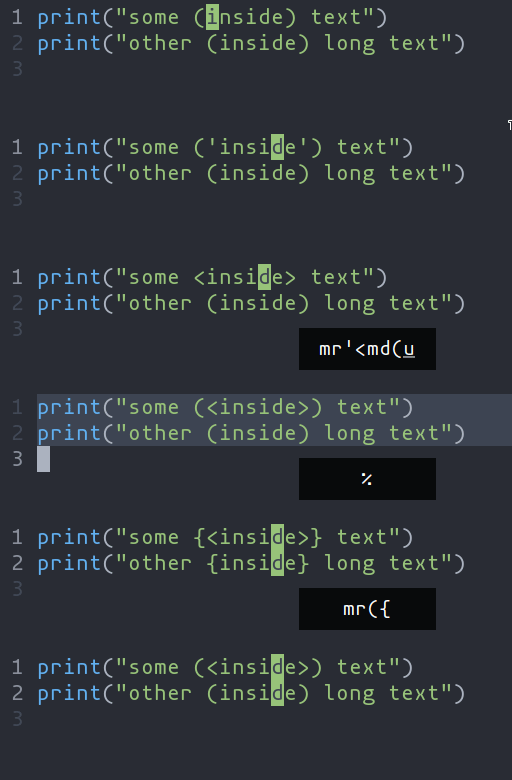
ms- Add surround charactersmr- Replace surround charactersmd- Delete surround characters
ms acts on a selection, so select the text first and use ms<char>. mr and md work
on the closest pairs found and selections are not required; use counts to act in outer pairs.
It can also act on multiple selections (yay!). For example, to change every occurrence of (use) to [use]:
%to select the whole filesto split the selections on a search term- Input
useand hit Enter mr([to replace the parens with square brackets
Multiple characters are currently not supported, but planned.
Textobjects
Currently supported: word, surround, function, class, parameter.

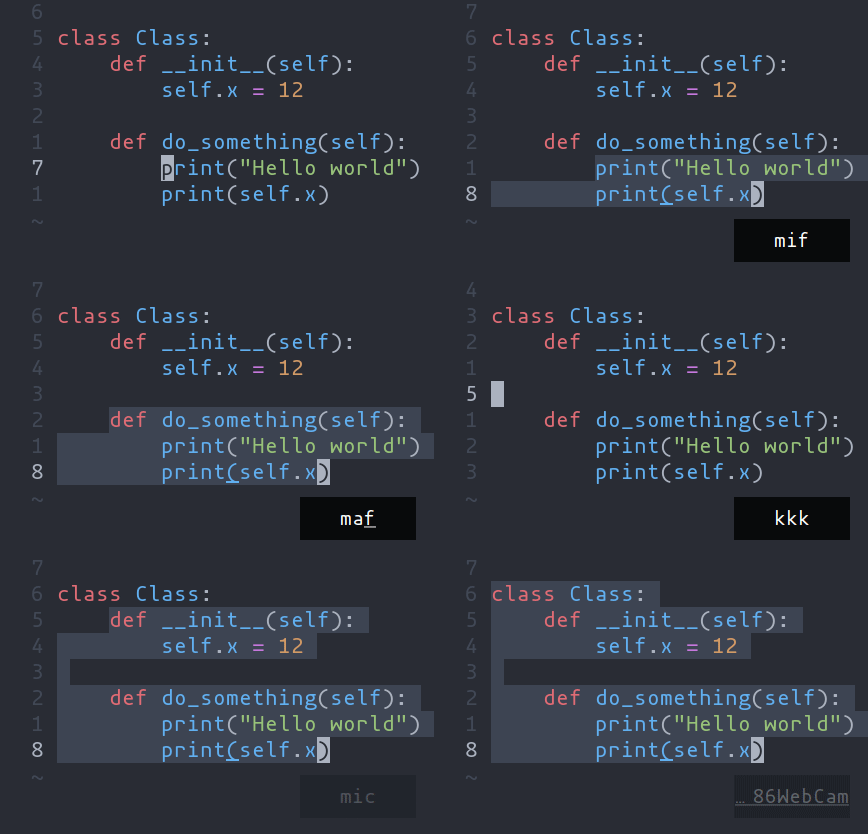
ma- Select around the object (vain vim,<alt-a>in kakoune)mi- Select inside the object (viin vim,<alt-i>in kakoune)
Key after mi or ma | Textobject selected |
|---|---|
w | Word |
W | WORD |
(, [, ', etc | Specified surround pairs |
f | Function |
c | Class |
a | Argument/parameter |
o | Comment |
NOTE:
f,c, etc need a tree-sitter grammar active for the current document and a special tree-sitter query file to work properly. Only some grammars currently have the query file implemented. Contributions are welcome!
Tree-sitter Textobject Based Navigation
Navigating between functions, classes, parameters, etc is made
possible by leveraging tree-sitter and textobjects queries. For
example to move to the next function use ]f, to move to previous
class use [c, and so on.

See the unimpaired section of the keybind documentation for the full reference.
NOTE: This feature is dependent on tree-sitter based textobjects and therefore requires the corresponding query file to work properly.